
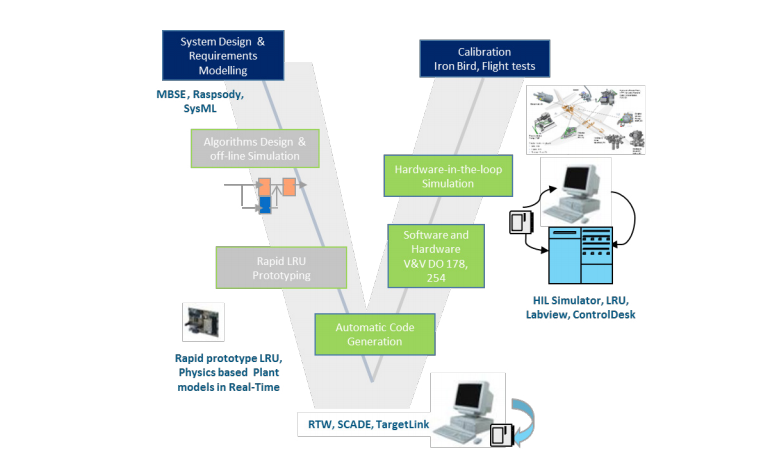
In a world of increasingly complex embedded systems—from electric vehicles to medical devices—Model-Based Development (MBD) is no longer a futuristic concept. It’s a proven, powerful engineering approach that reduces time-to-market, improves code quality, and strengthens system reliability.
But here’s the real question: How do you actually implement MBD in embedded systems successfully?
In this guide, we’ll walk through a step-by-step roadmap to adopt MBD in your embedded development workflow, supported by real-world examples, best practices, and practical tips.
🔍 What is Model-Based Development (MBD)?
Model-Based Development is a method of designing embedded systems using graphical models to represent logic, control algorithms, and system behavior. These models are used to simulate, test, and automatically generate production-ready code.
Popular tools:
- MATLAB/Simulink
- dSPACE TargetLink
- SCADE Suite
- NI VeriStand
- Simulink Coder / Embedded Coder
🎮 Think of MBD like creating a “digital twin” of your system before it physically exists—just like flight simulators are used to train pilots before they fly a real plane.
🚀 Why Use MBD for Embedded Systems?
Embedded systems often deal with tight deadlines, strict safety standards, and limited resources. MBD addresses these challenges by:
- Enabling early validation through simulation
- Reducing manual coding errors
- Accelerating development with automatic code generation
- Ensuring traceability for standards like ISO 26262 or DO-178C
- Simplifying testing through Model-in-the-Loop (MiL) and Hardware-in-the-Loop (HiL)
📘 Step-by-Step Guide to Implementing MBD in Embedded Projects
✅ 1. Define System Requirements and Interfaces
Start with clear functional and system-level requirements.
- Use SysML diagrams, Excel sheets, or tools like IBM DOORS or Simulink Requirements.
- Define all inputs, outputs, signals, and data types.
- Ensure teams across hardware, software, and systems engineering agree on the specifications.
🧱 This is the blueprint—without it, your model will lack structure.
✅ 2. Develop High-Level Behavioral Models
Build system behavior in Simulink or your preferred tool.
- Use state machines, control logic, and mathematical equations.
- Incorporate environmental models (e.g., motor dynamics, sensors, power supply).
- Validate functionality using Model-in-the-Loop (MiL) simulation.
📊 Example: For a BLDC motor controller, model the Hall sensor input, PWM output, and torque-speed curve.
✅ 3. Perform Model Simulation and Verification
Simulate the system under different input conditions:
- Validate response times, stability, fail-safes, and edge cases.
- Use test harnesses for automated testing.
- Analyze signal behavior using scopes and data inspectors.
💡 Catch logic bugs and unstable states before deploying to hardware.
✅ 4. Refine Model for Embedded Implementation
Optimize your model for deployment:
- Use Fixed-Step Solvers and Discrete-Time blocks.
- Replace high-level constructs with embedded-friendly blocks (e.g., LUTs instead of trigonometric functions).
- Ensure data types are compatible with your MCU (e.g.,
int16,uint8,float32).
🧠 This is like translating from a novel to an instruction manual—concise and hardware-aware.
✅ 5. Enable Automatic Code Generation
Use tools like Embedded Coder or TargetLink to generate C/C++ code from your model.
- Configure code generation settings (e.g., memory sections, function names).
- Validate the code using Software-in-the-Loop (SiL) simulation.
- Review auto-generated code for compliance and style (MISRA C if needed).
⚙️ Auto-generated code is functionally equivalent to the tested model—saving hours of manual effort.
✅ 6. Integrate with Hardware and Perform HiL Testing
- Flash the generated code onto your embedded hardware.
- Run real-time tests using Hardware-in-the-Loop (HiL) platforms like dSPACE or Speedgoat.
- Test fault conditions (e.g., overvoltage, missing sensor) in a safe, controlled environment.
📦 Test before you fly—simulate motor failures or torque spikes before risking hardware.
✅ 7. Establish Traceability and Compliance
If your project requires functional safety certification (e.g., ISO 26262, DO-178C, IEC 61508):
- Link requirements ⇨ models ⇨ test cases ⇨ code.
- Use tools like Simulink Requirements, Polyspace, or SCADE for verification and documentation.
- Maintain traceable artifacts for audits and certifications.
📑 Traceability isn’t optional—it’s your safety net.
🛠️ Tools and Platforms Commonly Used in MBD
🌍 Real-World Example: Implementing MBD in Electric Vehicle (EV) Inverter Control
Problem:
An automotive supplier needed to develop inverter control for an electric drivetrain using an STM32-based ECU.
MBD Implementation:
- Modeled torque commands, phase current control, and inverter protection logic in Simulink.
- Used Model-in-the-Loop to simulate acceleration profiles.
- Auto-generated C code using Embedded Coder.
- Integrated with dSPACE HiL system for fault simulation.
- Achieved ISO 26262 ASIL-C certification with full traceability.
Result:
- 45% reduction in development time
- 70% fewer post-integration bugs
- ISO-compliant artifacts generated automatically
📋 Best Practices for Successful MBD Implementation
- Modularize your model: Use subsystems and libraries.
- Start small: Pilot MBD on a single function before scaling.
- Train your team: MBD tools have a learning curve.
- Integrate with CI/CD: Use Jenkins or GitLab to test models on every commit.
- Review models like code: Apply version control and peer reviews.
✅ Conclusion: MBD is the Future of Embedded Development
Implementing Model-Based Development in embedded systems is not just a technical upgrade—it’s a cultural shift. It moves your team from reactive to proactive, from trial-and-error to simulation-driven precision.
With MBD, you design smarter, test earlier, code faster, and certify confidently.
📣 Ready to Get Started?
Whether you’re building motor control for an EV or designing safety logic for industrial automation, Model-Based Development gives you a predictable, testable, and scalable path forward.
🔗 Explore Simulink, dSPACE, and Embedded Coder today—and turn your models into reality.