
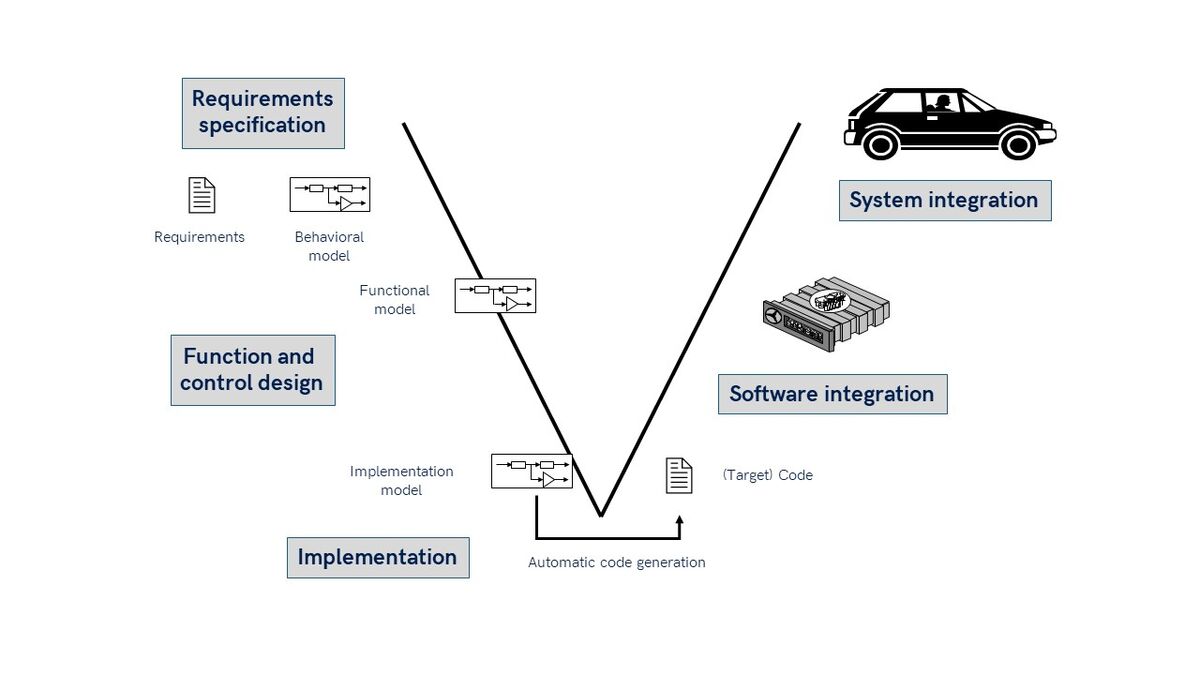
As embedded systems grow more complex—and deadlines tighter—automatic code generation has become a cornerstone of Model-Based Development (MBD). When done right, it delivers faster development, fewer bugs, and certification-ready code. But without the right practices, you might end up with bloated, unoptimized code that’s tough to debug.
In this post, we’ll explore the best practices and common pitfalls of code generation in MBD, equipping you with tips, tools, and insights to confidently go from model to machine.
🔍 What is Code Generation in Model-Based Development?
In Model-Based Development, engineers design algorithms and control systems using graphical models (typically in tools like Simulink or SCADE). These models are then automatically converted into C/C++ code for deployment on microcontrollers, ECUs, or real-time processors.
🚀 Think of it like translating a Lego model into precise CNC machine instructions—it automates the build without compromising the design.
🧠 Why Code Generation Matters
Traditional hand-coding:
- Is slow and error-prone
- Requires deep hardware knowledge
- Lacks traceability to requirements
Automatic code generation:
- Speeds up development
- Reduces manual errors
- Ensures consistency with models
- Supports safety compliance (e.g., ISO 26262, DO-178C)
But the quality of generated code depends heavily on how your models are designed and configured.
✅ Best Practices for Code Generation in MBD
Let’s dive into key practices that ensure robust, clean, and efficient code generation.
1. Design for Code, Not Just Simulation
Many engineers build models for simulation only—but forget that simulation-friendly features (like continuous blocks or floating-point math) may not be suitable for embedded code.
Best Practice: Design using discrete-time blocks, fixed-step solvers, and hardware-compatible data types (
int16, uint8, etc.).🔧 Use Embedded Coder’s Advisor Tool in Simulink to validate model settings for code generation.
2. Use Strong Naming Conventions and Signal Labels
Code readability matters—even for auto-generated code. Poorly named blocks can result in cryptic variable names like
rtb_Gain1_f.Best Practice:
- Use descriptive block names
- Label inputs/outputs clearly
- Prefix subsystems consistently (e.g.,
CTRL_,SENS_)
📘 Readable code helps with debugging, documentation, and code reviews—even if you didn’t write it manually.
3. Modularize with Reusable Subsystems and Libraries
Large monolithic models lead to huge, unmanageable code files.
Best Practice:
- Use library blocks, subsystems, and model references
- Encapsulate functional units (e.g., PID, filters, diagnostics)
- Enable code reuse across projects and teams
🧩 Think of each block as a microservice—clear input/output boundaries improve maintainability.
4. Choose the Right Code Generation Settings
Tool settings impact performance, memory usage, and compliance.
Best Practice:
- Optimize for speed, memory, or readability based on target hardware
- Enable function partitioning, inlining control, and code replacement libraries
- Choose MISRA C or certification-compatible options for safety-critical systems
⚙️ Simulink Embedded Coder and dSPACE TargetLink offer fine-grained control over these settings.
5. Simulate First, Generate Later
Always simulate your model under real-world conditions before generating code.
Best Practice:
- Perform Model-in-the-Loop (MiL) testing
- Use assertions, test harnesses, and signal logging
- Validate boundary conditions, saturation behavior, and fail-safes
🔍 Catch simulation bugs before they become code-level bugs—cheaper and faster to fix.
6. Validate with Software-in-the-Loop (SiL)
Once the code is generated, run Software-in-the-Loop (SiL) to ensure functional equivalence with the model.
Best Practice:
- Compare simulation output vs. generated code output
- Use coverage tools to test logic completeness
- Automate SiL in CI pipelines (e.g., Jenkins, GitLab CI)
📊 If SiL doesn’t match, your generated code may not reflect the intended behavior.
7. Profile Performance on Target Hardware
Generated code may behave differently under real-time constraints.
Best Practice:
- Profile task execution times
- Check for CPU overload or memory bottlenecks
- Use hardware debuggers (ST-Link, J-Link) for runtime analysis
🧪 Tools like Simulink Real-Time, dSPACE, and Speedgoat help with real-time testing.
⚠️ Common Pitfalls in MBD Code Generation
Now let’s look at mistakes to avoid.
❌ 1. Overusing Floating-Point Math on Low-End MCUs
Many MCUs lack floating-point units (FPUs). Using
double or float types can slow down execution dramatically.Fix: Use fixed-point math,
int16, or uint8 where appropriate. Tools like Fixed-Point Designer in Simulink assist with data type scaling.❌ 2. Hardcoding Constants and Magic Numbers
Hardcoded values lead to inflexible code.
Fix: Define constants in Data Dictionary, MAT-files, or Model Explorer for easy tuning and code reuse.
❌ 3. Ignoring Loop Timing and Task Deadlines
Generated code might miss real-time deadlines if not profiled correctly.
Fix: Estimate Worst-Case Execution Time (WCET), use Rate Transitions, and configure sample times properly.
❌ 4. Skipping Traceability
Without linking code to requirements, you’ll struggle with audits or certification.
Fix: Use Simulink Requirements, DOORS, or Polarion to establish end-to-end traceability.
🔧 Tools that Support High-Quality Code Generation
✅ Summary: Best Code Comes from Smart Models
Code generation in MBD isn’t just about pressing a button—it’s about designing models with code in mind, testing thoroughly, and configuring tools correctly.
When done right, it becomes your superpower:
- From weeks to minutes for controller software updates
- From handwritten bugs to tested and validated code
- From isolated dev to full traceability and compliance
📣 Final Tip: Don’t Treat Models as Prototypes—Treat Them as Products
Your model is not a rough sketch. It is the source of truth that defines your product’s behavior. So design it like production software—modular, readable, testable, and maintainable.