How to Implement Model Based Development in Embedded Systems
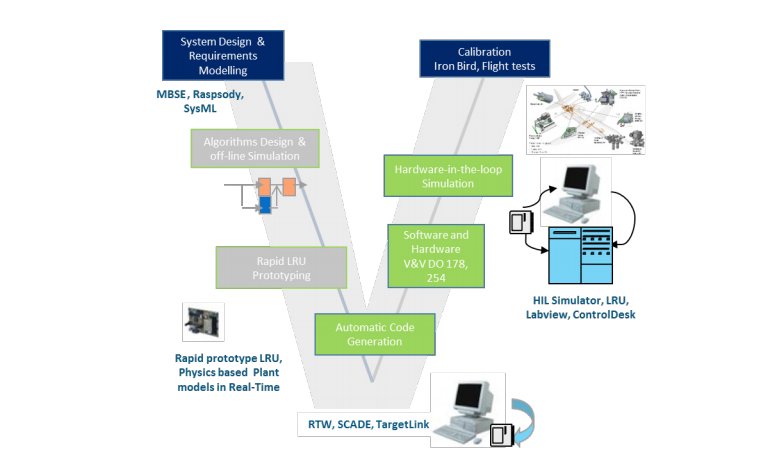
Embedded systems are becoming increasingly complex, from electric vehicles to medical devices. Model-Based Development (MBD) is no longer a futuristic concept. It is a proven engineering approach that reduces time-to-market, improves code quality and strengthens system reliability. The real question is how to implement MBD in embedded systems successfully. This guide walks through a step-by-step roadmap for adopting MBD in your embedded development workflow, with real-world examples, best practices and practical tips.
What is Model-Based Development (MBD)?
Model-Based Development is a method of designing embedded systems using graphical models to represent logic, control algorithms and system behavior. These models are used to simulate, test and automatically generate production-ready code. Popular tools include:
- MATLAB/Simulink
- dSPACE TargetLink
- SCADE Suite
- NI VeriStand
- Simulink Coder / Embedded Coder
Think of MBD as creating a "digital twin" of your system before it physically exists, just as flight simulators are used to train pilots before they fly a real plane.
Why use MBD for embedded systems?
Embedded systems often deal with tight deadlines, strict safety standards and limited resources. MBD addresses these challenges by:
- Enabling early validation through simulation
- Reducing manual coding errors
- Accelerating development with automatic code generation
- Ensuring traceability for standards like ISO 26262 or DO-178C
- Simplifying testing through Model-in-the-Loop (MiL) and Hardware-in-the-Loop (HiL)
Step-by-step guide to implementing MBD in embedded projects
1. Define system requirements and interfaces
Start with clear functional and system-level requirements.
- Use SysML diagrams, Excel sheets, or tools like IBM DOORS or Simulink Requirements.
- Define all inputs, outputs, signals and data types.
- Make sure teams across hardware, software and systems engineering agree on the specifications.
This is the blueprint. Without it, your model will lack structure.
2. Develop high-level behavioral models
Build the system behavior in Simulink or your preferred tool.
- Use state machines, control logic and mathematical equations.
- Incorporate environmental models, such as motor dynamics, sensors and power supply.
- Validate functionality using Model-in-the-Loop (MiL) simulation.
For example, for a BLDC motor controller, model the Hall sensor input, the PWM output and the torque-speed curve.
3. Perform model simulation and verification
Simulate the system under different input conditions.
- Validate response times, stability, fail-safes and edge cases.
- Use test harnesses for automated testing.
- Analyze signal behavior using scopes and data inspectors.
This catches logic bugs and unstable states before you deploy to hardware.
4. Refine the model for embedded implementation
Optimize your model for deployment.
- Use fixed-step solvers and discrete-time blocks.
- Replace high-level constructs with embedded-friendly blocks, for example LUTs instead of trigonometric functions.
- Make sure data types are compatible with your MCU, for example
int16,uint8andfloat32.
This is like translating a novel into an instruction manual: concise and hardware-aware.
5. Enable automatic code generation
Use tools like Embedded Coder or TargetLink to generate C/C++ code from your model.
- Configure the code generation settings, such as memory sections and function names.
- Validate the code using Software-in-the-Loop (SiL) simulation.
- Review the auto-generated code for compliance and style (MISRA C if needed).
Auto-generated code is functionally equivalent to the tested model, which saves hours of manual effort.
6. Integrate with hardware and perform HiL testing
- Flash the generated code onto your embedded hardware.
- Run real-time tests using Hardware-in-the-Loop (HiL) platforms like dSPACE or Speedgoat.
- Test fault conditions, such as overvoltage or a missing sensor, in a safe, controlled environment.
Test before you fly: simulate motor failures or torque spikes before risking hardware.
7. Establish traceability and compliance
If your project requires functional safety certification (for example ISO 26262, DO-178C or IEC 61508):
- Link requirements → models → test cases → code.
- Use tools like Simulink Requirements, Polyspace or SCADE for verification and documentation.
- Maintain traceable artifacts for audits and certifications.
Traceability is not optional. It is your safety net.
Real-world example: MBD in EV inverter control
Problem
An automotive supplier needed to develop inverter control for an electric drivetrain using an STM32-based ECU.
MBD implementation
- Modeled torque commands, phase current control and inverter protection logic in Simulink.
- Used Model-in-the-Loop to simulate acceleration profiles.
- Auto-generated C code using Embedded Coder.
- Integrated with a dSPACE HiL system for fault simulation.
- Achieved ISO 26262 ASIL-C certification with full traceability.
Result
- 45% reduction in development time
- 70% fewer post-integration bugs
- ISO-compliant artifacts generated automatically
Best practices for successful MBD implementation
- Modularize your model: use subsystems and libraries.
- Start small: pilot MBD on a single function before scaling.
- Train your team: MBD tools have a learning curve.
- Integrate with CI/CD: use Jenkins or GitLab to test models on every commit.
- Review models like code: apply version control and peer reviews.
Summary
Implementing Model-Based Development in embedded systems is not just a technical upgrade. It is a cultural shift that moves your team from reactive to proactive, and from trial-and-error to simulation-driven precision. With MBD you design smarter, test earlier, code faster and certify confidently.
Whether you are building motor control for an EV or designing safety logic for industrial automation, MBD gives you a predictable, testable and scalable path forward. Explore Simulink, dSPACE and Embedded Coder, and turn your models into reality.
Watch our workshop videos on the Reynlab YouTube Channel. You can also explore our automotive training programs at www.reynlab.com/our-courses.