
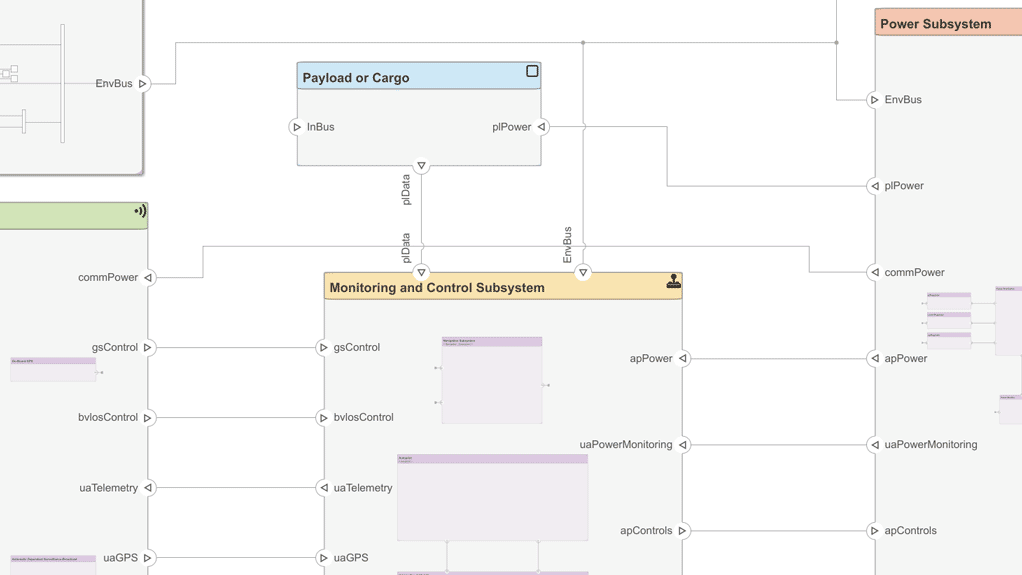
In today’s fast-paced world of embedded systems, automotive engineering, and aerospace innovation, designing robust control algorithms requires more than just code—it demands a higher level of abstraction and simulation. Enter Simulink, a cornerstone of Model-Based Design (MBD).
If you’re new to Simulink or just starting your MBD journey, this guide will walk you through the essentials of using Simulink, explain how it fits into the model-based workflow, and offer expert tips to help you build, simulate, and deploy smarter systems—faster.
🧠 What is Simulink?
Simulink, developed by MathWorks, is a graphical programming environment for modeling, simulating, and analyzing dynamic systems. It is fully integrated with MATLAB and is widely used across industries for control systems, signal processing, power systems, and more.
Think of Simulink as your digital engineering whiteboard, where you sketch system behavior using blocks instead of text-based code.
🌐 Why Use Simulink for Model-Based Design?
Model-Based Design (MBD) is the process of using models as the central artifact for development—from design to simulation to code generation and testing.
Using Simulink with MBD allows you to:
- Design visually using prebuilt or custom blocks
- Simulate system behavior before hardware exists
- Auto-generate embedded C/C++ code
- Perform real-time testing on hardware
- Link to requirements and perform traceability for certification
🎯 Whether you’re creating a PID controller for an EV or simulating sensor fusion in a drone, Simulink lets you “test before you build.”
🛠️ Key Simulink Components You Need to Know
Here are the building blocks of your Simulink journey:
✅ 1. Blocks and Libraries
- Simulink models are built using drag-and-drop blocks (like Add, Gain, Scope).
- Block libraries include Math Operations, Signal Routing, Sinks/Sources, and Control Systems.
✅ 2. Simulink Canvas
- This is where you create your model diagram—connect blocks using lines to define data flow.
✅ 3. Solver Settings
- Defines how time progresses in the simulation (e.g., fixed-step for embedded systems, variable-step for desktop simulations).
✅ 4. Data Types and Signals
- Every signal in Simulink has a data type and sample time, critical for accurate embedded behavior.
🎯 Best Practices for Simulink Modeling
✔️ 1. Use Descriptive Naming
- Name signals and blocks clearly for easier debugging.
✔️ 2. Group Logic into Subsystems
- Use Subsystems to break complex designs into manageable parts.
✔️ 3. Use Sample Time Properly
- For embedded deployment, set fixed-step solvers and discrete-time blocks.
✔️ 4. Comment and Document
- Add notes and annotations inside the model to explain design decisions.
✔️ 5. Version Control Your Models
- Use Git, SVN, or MATLAB Projects to manage changes.
🚀 Extending Simulink for Embedded Systems
Once your model is working, here’s how Simulink supports a full embedded development pipeline:
🔄 Simulation Types:
- Model-in-the-Loop (MiL) – validate logic
- Software-in-the-Loop (SiL) – validate generated code
- Processor-in-the-Loop (PiL) – validate code on target MCU
- Hardware-in-the-Loop (HiL) – validate full system using real-time hardware
🔁 Code Generation:
With Embedded Coder, you can:
- Generate MISRA C-compliant code
- Integrate with AUTOSAR environments
- Deploy directly to MCUs like STM32, TI C2000, NXP, etc.
📦 Integration with Other Tools:
- Simulink Requirements – link blocks to textual requirements
- Simulink Coverage – analyze test coverage (MC/DC, branch, condition)
- Polyspace – static code analysis for safety-critical software
💼 Real-World Applications of Simulink
🚗 Automotive:
- Motor control for electric vehicles
- ADAS algorithms and sensor fusion
- Battery management systems (BMS)
✈️ Aerospace:
- Flight control systems
- Navigation and guidance systems
- Environmental control units (ECUs)
⚙️ Industrial & Robotics:
- PLC and HMI integration
- Motion control for robotic arms
- Predictive maintenance with digital twins
🎮 From Tesla to Boeing, industry leaders use Simulink to model and deploy critical software.
⚠️ Common Beginner Pitfalls
❌ Using Variable-Step for Embedded Projects
Fix: Switch to fixed-step solvers when targeting microcontrollers.
❌ Overcomplicating Early Models
Fix: Start simple and modular; avoid trying to model the whole system at once.
❌ Ignoring Data Types
Fix: Explicitly define data types for memory and speed optimization.
🧭 What’s Next After Learning Simulink?
Here’s how to level up:
- Explore Stateflow for event-driven logic and finite state machines
- Use Embedded Coder for automatic code generation
- Try Simscape for physical modeling (e.g., hydraulics, thermal)
- Build test harnesses using Simulink Test
- Simulate real-time systems using Speedgoat or dSPACE HiL platforms
📣 Final Thoughts: Simulink Empowers Smarter, Faster Engineering
Learning Simulink is like learning the piano—start simple, practice often, and you’ll compose engineering symphonies in no time.
With the rise of autonomous systems, EVs, and IoT, the demand for simulation-driven development is skyrocketing. Simulink gives you the power to move from idea → simulation → hardware with unmatched clarity and control.