How to Integrate Model‑Based Development (MBD) into Agile and DevOps Workflows
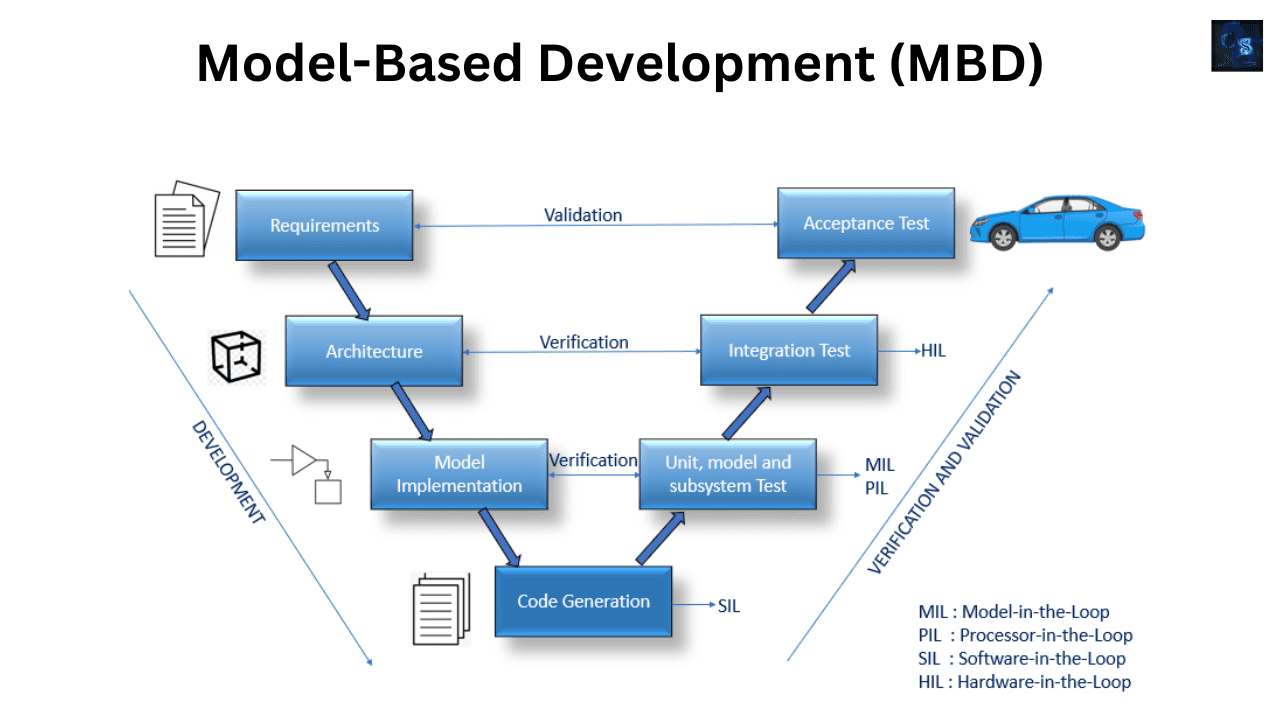
Engineering teams are under pressure to deliver smarter systems faster without compromising on quality or safety. This is especially true in industries like automotive, aerospace and industrial automation, where embedded systems grow increasingly complex. So how do you integrate Model‑Based Development (MBD), a traditionally sequential engineering approach, into Agile and DevOps workflows that are designed for speed and iteration?
This post explains how to bring models, simulations and auto-generated code into the modern CI/CD pipeline, so that your embedded systems development is as lean and adaptive as your software team.
Quick recap: what is Model‑Based Development (MBD)?
Model‑Based Development uses graphical models (for example Simulink or SCADE) to design, simulate and generate embedded software. Instead of writing code line by line, engineers build models that are:
- Simulated for correctness
- Automatically translated into code
- Tested against requirements
Think of MBD as the "Lego Technic" of software design: you build logic from functional blocks, test it virtually and deploy it directly.
The challenge: MBD meets Agile and DevOps
Traditionally, MBD has been associated with waterfall-like workflows: model first, then test, generate code, integrate and verify. Agile and DevOps, by contrast, focus on:
- Rapid iterations
- Continuous integration
- Incremental deliveries
- Cross-functional collaboration
At first glance, these approaches seem at odds. But integrating MBD into Agile and DevOps workflows is not only possible, it is transformative.
Why integrate MBD with Agile and DevOps?
- Faster feedback: catch issues in model logic and simulations early.
- Traceability: link requirements, models and tests in one CI pipeline.
- Automation: auto-generate and test embedded code in every sprint.
- Scalability: coordinate large teams across control, software and systems engineering.
Your control algorithm is not done when the model works. It is done when it runs on hardware and passes tests, and DevOps closes that loop.
How to integrate MBD into Agile/DevOps: a step-by-step blueprint
1. Modularize your models for iterative development
Break large Simulink or SCADE models into logical subsystems such as control loops, diagnostic modules and interface layers. This enables incremental testing, allows parallel development across teams and simplifies version control. Like microservices in software, modular models make updates safer and faster.
2. Use version control (Git, SVN) for models
Even though MBD tools use graphical UIs, their underlying files are text-based or XML. Best practices:
- Use .SLX, .MDL or .SCADE formats with version control.
- Use model differencing tools (for example Simulink Compare).
- Store test harnesses, data files and simulation configs with your model.
Version control makes model evolution transparent and recoverable.
3. Automate testing with CI tools
Set up Continuous Integration (CI) pipelines using Jenkins, GitLab CI, Azure DevOps or Bamboo. On each commit or merge:
- Run Model-in-the-Loop (MiL) simulations.
- Execute Software-in-the-Loop (SiL) validation.
- Compare outputs with baselines.
- Generate code coverage and test reports.
Treat your model like code and test it every time it changes.
4. Use scripting for automation (MATLAB, Python)
MBD tools support scripting interfaces, including MATLAB scripts for Simulink automation, Python wrappers for simulation runs, and batch code generation and model validation. Use them to:
- Run batch simulations.
- Check for model guideline compliance.
- Trigger code generation and deploy artifacts.
Scripts are the glue between MBD tools and CI pipelines.
5. Deploy auto-generated code to real hardware
Do not stop at simulation. Use Simulink Real-Time, Speedgoat, dSPACE or custom boards, together with Processor-in-the-Loop (PiL) and Hardware-in-the-Loop (HiL) frameworks. This lets you validate timing constraints, test real sensor feedback and actuation, and measure execution time and memory. Shift-left testing meets physical validation, so there are no surprises at integration time.
6. Integrate requirements and traceability
Use tools like Simulink Requirements, IBM DOORS Next or Polarion ALM to:
- Link model blocks to textual requirements.
- Track test results against specifications.
- Generate audit-ready compliance reports for ISO 26262 and DO-178C.
In safety-critical systems, traceability is not optional. It is mandatory.
7. Involve cross-functional teams early
Agile is all about collaboration. Invite controls, software, test and hardware engineers into model reviews. Use Simulink Review Manager or an equivalent to comment on model versions, and share simulations as video clips, plots or web interfaces. Do not keep your models siloed. Make them a living part of the product backlog.
DevOps pipeline example with MBD
A modern DevOps pipeline for model-based embedded development might look like this:
- Code commit (Git): a model or requirement is updated.
- Build triggered (Jenkins/GitLab).
- Model checks: guidelines, data types and solver settings.
- Simulation (MiL, SiL): run tests and compare outputs.
- Code generation: generate embedded C code via Embedded Coder or TargetLink.
- Unit testing and code analysis: run Polyspace and static analysis.
- PiL/HiL deployment: test the generated code on target hardware.
- Feedback and reports: push results to dashboards and notify engineers.
This takes you from a model edit to real-time testing in minutes, not months.
Pitfalls to avoid
Modeling in isolation
Failing to consider integration early leads to rework. Involve software and hardware teams in model design.
Manual code generation and deployment
Manual steps break automation. Use scripts and CI tools to automate everything.
Monolithic models
They are hard to test or integrate iteratively. Design modular, testable model components.
Summary
Model-Based Design may look like an old-school, top-down method, but combined with Agile practices and DevOps automation it enables faster release cycles, safer systems, scalable embedded development and better collaboration across disciplines. Stop thinking in silos. Models are code, so treat them like any other software artifact.
Watch our workshop videos on the Reynlab YouTube Channel. You can also explore our automotive training programs at www.reynlab.com/our-courses.